I have now created a new photo albums feature. All registered users can create albums and upload your photos. You must be a registered user to upload photos.
Here is the process:
- Log into accet87.net with your username and password. If you have not registered yourself, you are missing a lot. Register now.
- Once you log in, click on the “Dashboard” link in the top left of the site.
- See the arrow in the picture.

- The dashboard looks like this:
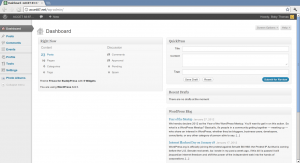
- Click the Photo Albums in bottom of the left column
- In the next screen create a new album
- Then add photos to the album
- Please post images of size no more than 600 x 600 px
- If you need help, ask for help through the contact form

You can also submit a blog post by clicking Posts and then Add New from the dashboard or mouseover the Dashboard link at the top and then select New Post from the menu. After composing the post click “Submit to Review” and we will check everything looks good before we publish. You can add pictures to your post if you like.
Now check out the photo albums. I am sure each of you is eager to see others albums & posts. Go ahead and give it a try! Dont worry about messing up anything. We will take care of it.